Spatial audio settings
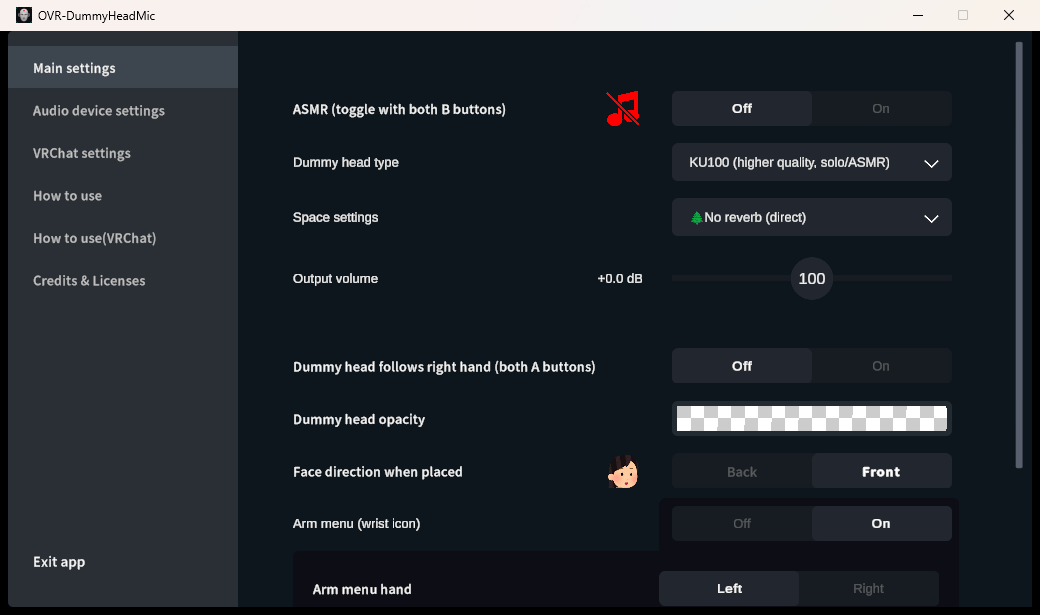
The current English Main settings screen, captured from the application. It includes the spatial-audio toggle, dummy-head type, room preset, output volume, placement direction, and arm-menu settings.
Toggle spatial audio
With typical bindings, press left Y + right B, or both B buttons, to toggle spatial audio processing. The dummy head is white when ON and red when OFF. Check the in-app binding names for your controller.
Dummy head type
- Standard: For general use, such as conversations with multiple people
- KU100: A high-quality character suited to solo streaming and ASMR
- KEMAR: A character based on measurements that include the torso
Perception varies from person to person. Compare them with headphones and choose the one that suits your use.
Room preset
Choose from “No reverb,” small room, bathroom, hall, tunnel, and other presets. We recommend “No reverb” for initial checks and positioning. Strong reverb can make it difficult to judge the direction of the direct sound.
Output volume
Adjust the volume to avoid clipping, and check the final stream level on the OBS meter as well.